A request that used to answer in milliseconds now holds a CPU core at 100 percent and does not return. The traffic did not change. The diff added one line of validation, a regular expression that reads fine on a phone screen, and now a single user-supplied field decides whether your worker survives the request.
This post walks through the pattern shapes that cause it, how to confirm a suspect pattern locally before it ships, and the rewrites that make input length stop mattering. Every timing number below comes from measurements I ran in Node 24 on the exact input shapes from this quarter’s advisories, not from a spec sheet or a benchmark someone else published. Once you know what to look for, you can read the problem straight off a diff.
What Catastrophic Backtracking Does to a Request
Backtracking is not a bug. The engine tries a path, the match fails partway through, and it rewinds to try another. Nothing about that is unusual: the engine cannot know whether \d+ should stop at a digit or a letter, so it guesses, fails, and rewinds until something lines up. Rewinds stay cheap while the pattern stays unambiguous.
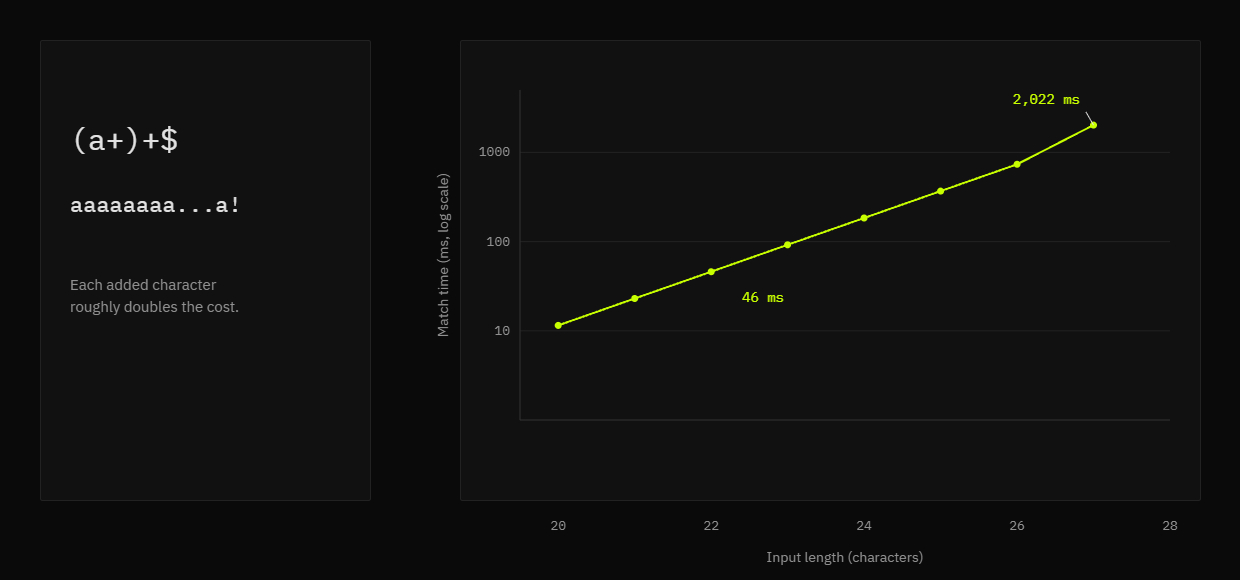
Nested quantifiers are where the cheap rewinds stop being cheap. Wrap a quantifier around a group that already contains one, and the same run of characters splits in many different ways, each of which the engine tries as though it were a different string. Measured in Node, (a+)+$ against a run of a characters followed by one character that cannot match takes 46 ms at 22 characters and 2,022 ms at 27. Each character you add roughly doubles that cost, which is why no unit test catches this.1
Textbooks reach for exponential cases like (a+)+$, and most production advisories are nothing like that. They are quadratic, which sounds gentler until you price it. Measured on the GitPython author-line shape, one 64,000 byte field costs 4.16 seconds.2 From a defender’s seat the exponential-versus-quadratic distinction barely matters, because both shapes let one crafted field hold a core for as long as an attacker wants. OWASP documents how a single malformed input field triggers a regular expression denial of service, and MITRE files the underlying weakness as CWE-1333, inefficient regular expression complexity.
The Patterns That Trigger It
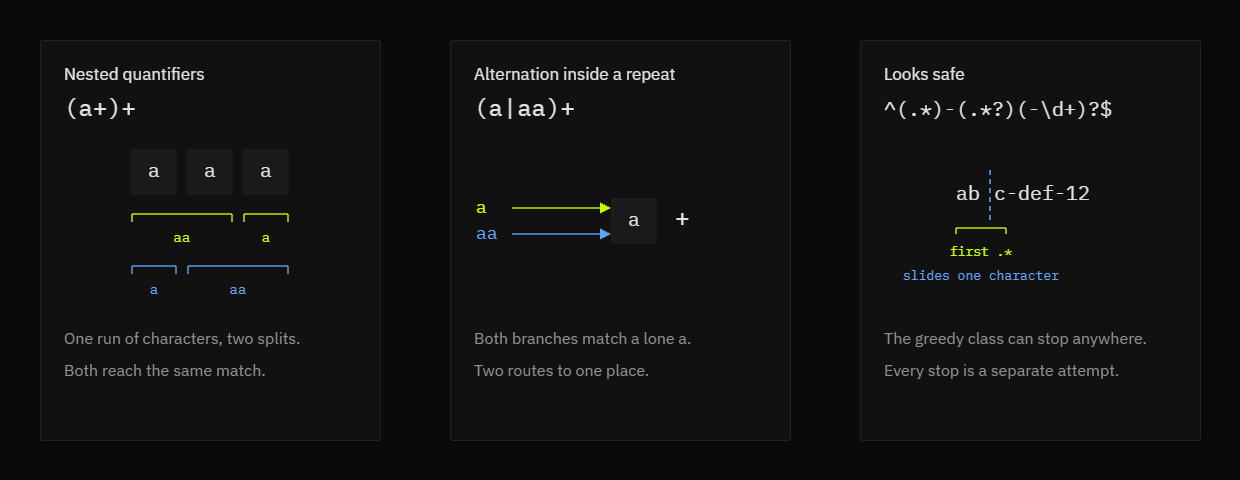
In practice, three shapes account for nearly every ReDoS advisory published this year. None of them look broken. All three survive a code review that reads the pattern as English instead of as a set of candidate splits, which is why the review question has to change from whether the pattern looks right to whether two splits of the same input could produce the same match.
Nested quantifiers
A quantifier wrapped around a group that already contains a quantifier is the primary offender. (a+)+ is the smallest example that fails on a short string. The overlap does the damage, because two different splits of the same input produce the same match, so the engine has no reason to prefer one over the other and tries them all before it can declare failure.
Alternation inside a repeat
Alternation hides the same ambiguity with only one quantifier on the page. (a|aa)+ carries a single plus sign, yet it blows up the same way, because both branches can match a lone a. Removing the plus does not fix it. Rewriting the branches so exactly one can match any given character is what fixes it.
The patterns that look safe
Validation patterns hide this better than anything. A loose email check built from .* and optional groups, or a date pattern with several optional segments, reads fine and passes every test you wrote by hand. The failure only shows up when the input runs one character longer than your fixture, which is exactly the length a fuzzer reaches first. Your tests never saw it, and the happy path keeps passing right up to the day the bug ships.
Where It Shows Up in Real Code: This Quarter’s CVEs
GitPython took the cleanest hit. In git/util.py, Actor.name_email_regex compiles (.*) <(.*?)> and runs it against every commit author line it parses, so a single crafted commit object stalls every API call that reads .author. The advisory’s own measurement puts a 200,000 byte author field at roughly 150 seconds.2 My run of the same shape in Node agrees on the scaling: 4.16 seconds at 64,000 bytes, with each doubling of the input multiplying the time by about four.
SvelteKit’s content-negotiation parser backtracks on a malformed Accept header, fixed in 2.70.2.3 basic-ftp backtracks inside RE_LINE when a Unix-style directory listing line starts valid and then fails to resolve a size or a date, fixed in 6.2.1.4 Neither needs authentication, and neither lives in code that anyone reviewed as an input boundary.
Open WebUI closes the set with the case where the attacker supplies the pattern itself, since a user-authored search expression ran unfiltered from 0.9.6 until 0.11.0.5 Reading the four advisories together, a pattern emerges. Every one of these is an internal utility expression, written once to parse something, never revisited, and shipped inside a library that downstream teams depend on without reading the source.
| Package | CVE | Triggering input | Fixed version |
|---|---|---|---|
| GitPython | CVE-2026-87819 | Commit author field with an unterminated < | 3.1.60 |
| SvelteKit | CVE-2026-66062 | Malformed Accept header | 2.70.2 |
| Open WebUI | CVE-2026-70493 | User-supplied search pattern | 0.11.0 |
| basic-ftp | CVE-2026-102990 | Crafted listing line from a hostile FTP server | 6.2.1 |
Testing a Pattern Against the Longest Input You Expect
The test that matters is the negative one. Positives prove nothing, because a positive test only confirms the pattern accepts what you already believed it accepts. Build the input that should fail, make it one character longer than any real record, and paste it into a regex tester that reports a timeout instead of hanging before the pattern goes anywhere near a pull request.
Run the drill in this order, because each step depends on the one before it. Skipping straight to the timeout check tells you nothing about which pattern shape produced the blow-up. Match the flags your production code actually uses, extend the string past the realistic maximum, and read the result against a ceiling rather than a wall clock.
- Load the pattern and set the flags your production code actually uses.
- Extend the test string past the maximum your records ever reach.
- Watch for the timeout message rather than a pass or a fail.
- If it times out, shorten the string until it does not, and treat that length as your real ceiling.
Inside a dedicated Web Worker, every evaluation gets a hard 500 ms budget. What makes this safe to run on your own machine is containment: the worker is a separate thread that MDN documents as terminating immediately the moment you call terminate() on it. CapyToolkit’s browser-based tools run entirely on your machine, and this tester is the case where that matters most. If the worker fails to answer in time, the tool kills the thread, spins up a fresh one for your next keystroke, and names the pattern shape that usually causes the blow-up. The tab keeps scrolling the whole time.
Read the result as a ceiling, not as a measurement. A pattern that times out on 30 characters will time out on 3,000 and on 30,000, because the shape of the pattern is the problem, not the length of the string you happened to try. If you want the diagnosis walked through step by step, the guide to debugging catastrophic backtracking before a pattern ships runs the same drill against the shapes in this post.
Rewrites That Remove the Backtracking
With JavaScript, the rewrite has one job: give the engine exactly one way to split the input. Ambiguity is the target, not backtracking, because an engine that has only one path available cannot get lost no matter how long the input runs. Every technique below narrows the pattern until there is nothing left to try.
Anchor the repeated class
Replace .* and overlapping branches with an explicit character class. The class states which characters belong where, so the engine stops guessing at the boundary. GitPython’s own fix is the smallest version of this idea: the name group stops being allowed to contain the character the engine is hunting for.
const nameEmail = /(.*) <(.*?)>/;
const nameEmailNegated = /([^<>]*) <([^<>]*)>/;
const nameEmailSafe = /^([^<>\n]{1,256}) <([^<>\n]{1,256})> (\d{10}) ([+-]\d{4})$/;
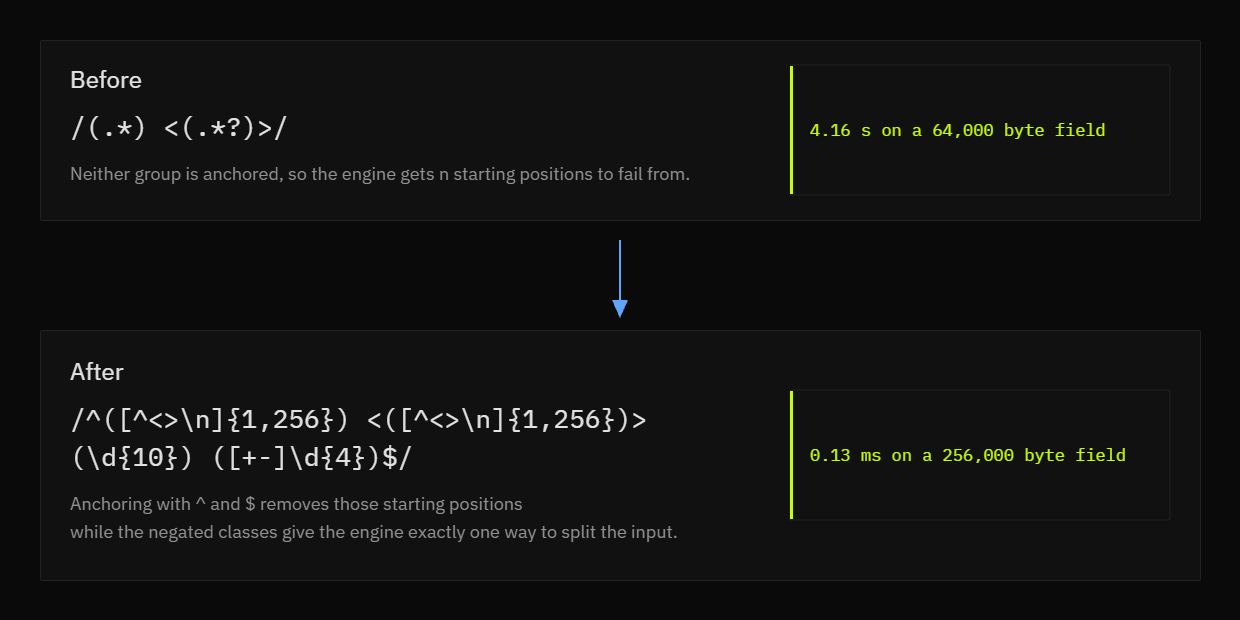
Before you copy that middle pattern verbatim, measure it. On the advisory’s own input shape, the negated class barely moves the needle: the original needs 4.16 seconds on a 64,000 byte author field, and the negated one needs 3.74. Both roughly quadruple when the input doubles. Neither pattern is anchored, so the engine still gets n starting positions to fail from, and that is what makes the whole thing quadratic.
Make the boundaries unambiguous
Give the engine a single unambiguous place to stop, and give it nowhere else to look. A delimiter the class cannot consume handles the first half. Anchoring with ^ and $ handles the second, because it removes the n possible starting positions that turn a linear scan into a quadratic one. Order stops mattering once the class is explicit, since .* and .*? differ only in the sequence they try their splits.
What to do without atomic grouping
JavaScript gives you no atomic groups and no possessive quantifiers, so you cannot suppress backtracking even when you want to.6 The rewrite has to remove the ambiguity instead. Three shapes do the work: a tighter character class, a bounded repeat with a real maximum you derived from the data, or splitting one pattern into two passes where the first pass narrows the field.
Anchoring and bounding together buy the most. The third pattern above still parses a real author line correctly and still rejects the malformed ones, but it now needs 0.13 ms on a 256,000 byte field where the original needs seconds on a field sixty times smaller. Once the pattern is safe, reshaping the matched text is a separate job, and reformatting capture groups in Replace mode handles that without touching the pattern again.
Reaching for a linear-time engine is the other exit. Go’s regexp package, Rust’s regex crate, and RE2 all compile to automata that never backtrack, so the shapes in this post are not expressible as attacks there.78 The price is a shorter feature list: no backreferences and no lookaround, because both need the engine to reconsider a decision it already made.9 Capture groups survive the trade. If you are writing a validator that runs on untrusted input, giving those features up is usually the right call. If the pattern has to ship to a browser, the anchor-and-bound rewrite above is the tool you actually have.
Pinning the Fix Down With a Test Suite
A pattern is finished when it has negative cases. Negative cases come first, because the common bug is matching more than you intended rather than failing to match at all, and a positive test cannot see either direction. Write the string that should not match first, then the one that should, and check that both behave.
An email pattern is the clearest case. [email protected] should pass, a bare word should fail, and a string with two @ signs should fail. Those three rows catch the two mistakes that matter: a class loose enough to match a space, and a pattern that stops at the first @ and lets the rest through unchecked. If you want the boundary strings to work from, testing an email validation regex against real and fake addresses covers the ones most patterns get wrong.
A small regression suite keeps the fix honest, and unit testing a regex pattern with should-match and should-not-match rows re-runs the whole set on every edit with an immediate pass or fail badge. Wire that suite into CI and the shapes in this post stop being something a reviewer has to remember. The reason is boring and important: the failure only appears on input longer than any fixture a human writes by hand. When you share the link, the pattern, the flags, and the suite travel inside the URL, so a reviewer opens the evidence instead of a claim. For an email pattern the rows look like this:
- Should match:
[email protected] - Should match:
[email protected] - Should not match:
plainword - Should not match:
a@[email protected] - Should not match:
user@example
Why the Test Text Should Not Leave Your Machine
In practice, the standard way to test a pattern is to paste it into an online tester alongside a few sample log lines. That is the exact payload you do not want to ship off the box, because a log line captured during a validation failure usually contains the field that failed. The field is what the attacker controlled, and it is already sitting in your clipboard. That is the whole leak.
CapyToolkit’s regex tester changes what leaves the machine: nothing does. The pattern, the test text, and every match stay inside the browser tab, running against JavaScript’s own engine, and you can drop the network connection after the page loads to prove it. That matters here more than anywhere else in the catalog, because the test text is the payload.
One trade-off is worth naming. A browser tester exercises one engine, and JavaScript has no possessive quantifiers or atomic groups, so a pattern destined for Python, PCRE, or Go still needs its edge cases checked in that runtime. The habit that follows is cheap. Keep a failing case next to the fix, in the test suite rather than in a comment or a ticket, so the next person who touches the pattern inherits the evidence.
- 1.
Russ Cox, “Regular Expression Matching Can Be Simple And Fast,” swtch.com, January 2007. https://swtch.com/~rsc/regexp/regexp1.html
- 2.
gitpython-developers, “Denial of Service via catastrophic backtracking (ReDoS) in Actor.name_email_regex,” github.com, August 2026. https://github.com/gitpython-developers/GitPython/security/advisories/GHSA-g5vv-9gxw-82hx
- 3.
Open Source Vulnerabilities, “CVE-2026-66062,” osv.dev, August 2026. https://osv.dev/vulnerability/CVE-2026-66062
- 4.
patrickjuchli, “Quadratic-time CPU denial of service in Client.list() Unix directory-listing parser (RE_LINE backtracking),” github.com, August 2026. https://github.com/patrickjuchli/basic-ftp/security/advisories/GHSA-c475-qrg2-pj4r
- 5.
Open Source Vulnerabilities, “CVE-2026-70493,” osv.dev, August 2026. https://osv.dev/vulnerability/CVE-2026-70493
- 6.
TC39, “Regular Expression Atomic Operators for ECMAScript,” tc39.es, June 2022. https://tc39.es/proposal-regexp-atomic-operators/
- 7.
The Go project, “regexp package,” pkg.go.dev, accessed October 2026. https://pkg.go.dev/regexp
- 8.
Russ Cox, “Regular Expression Matching in the Wild,” swtch.com, March 2010. https://swtch.com/~rsc/regexp/regexp3.html
- 9.
The Rust Project, “regex crate documentation,” docs.rs, accessed October 2026. https://docs.rs/regex/latest/regex/


 Install from Microsoft Store